Table
Summaries
A column aggregated into a footer value — on the main table, on sub-rows, and over a relationship.
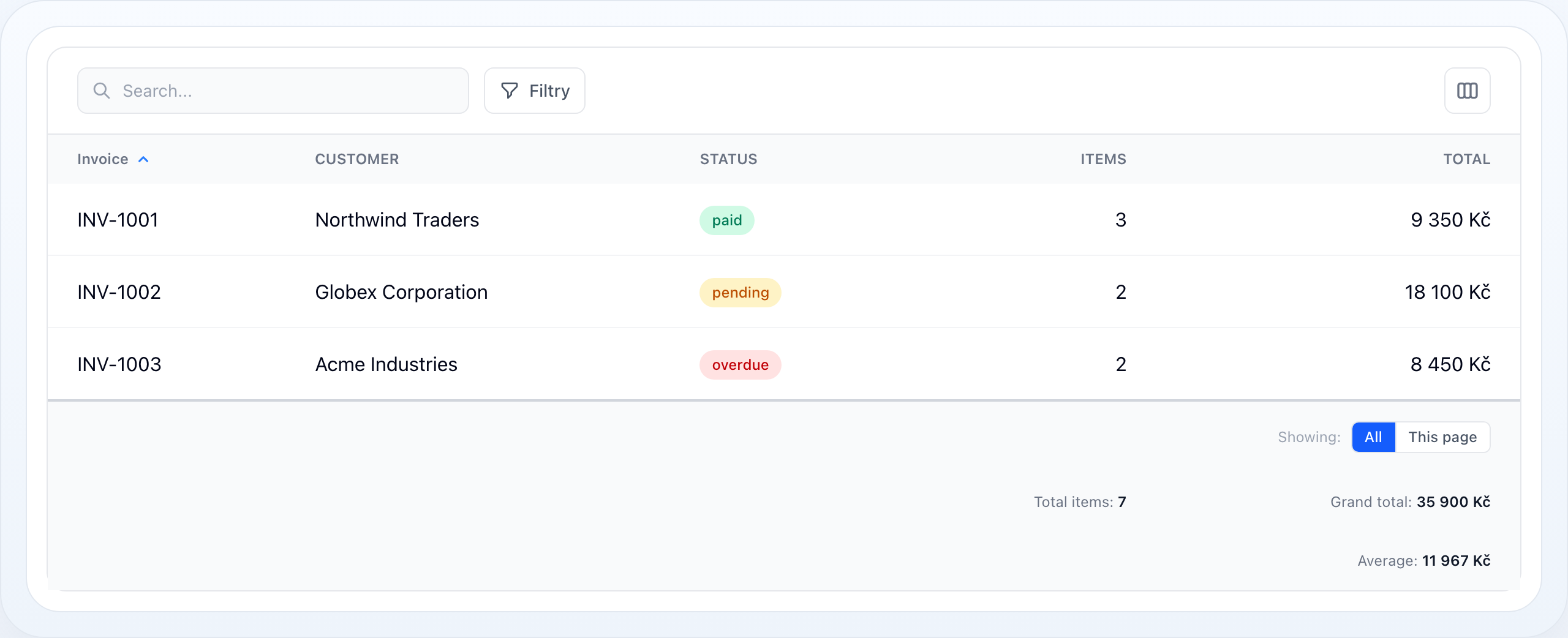
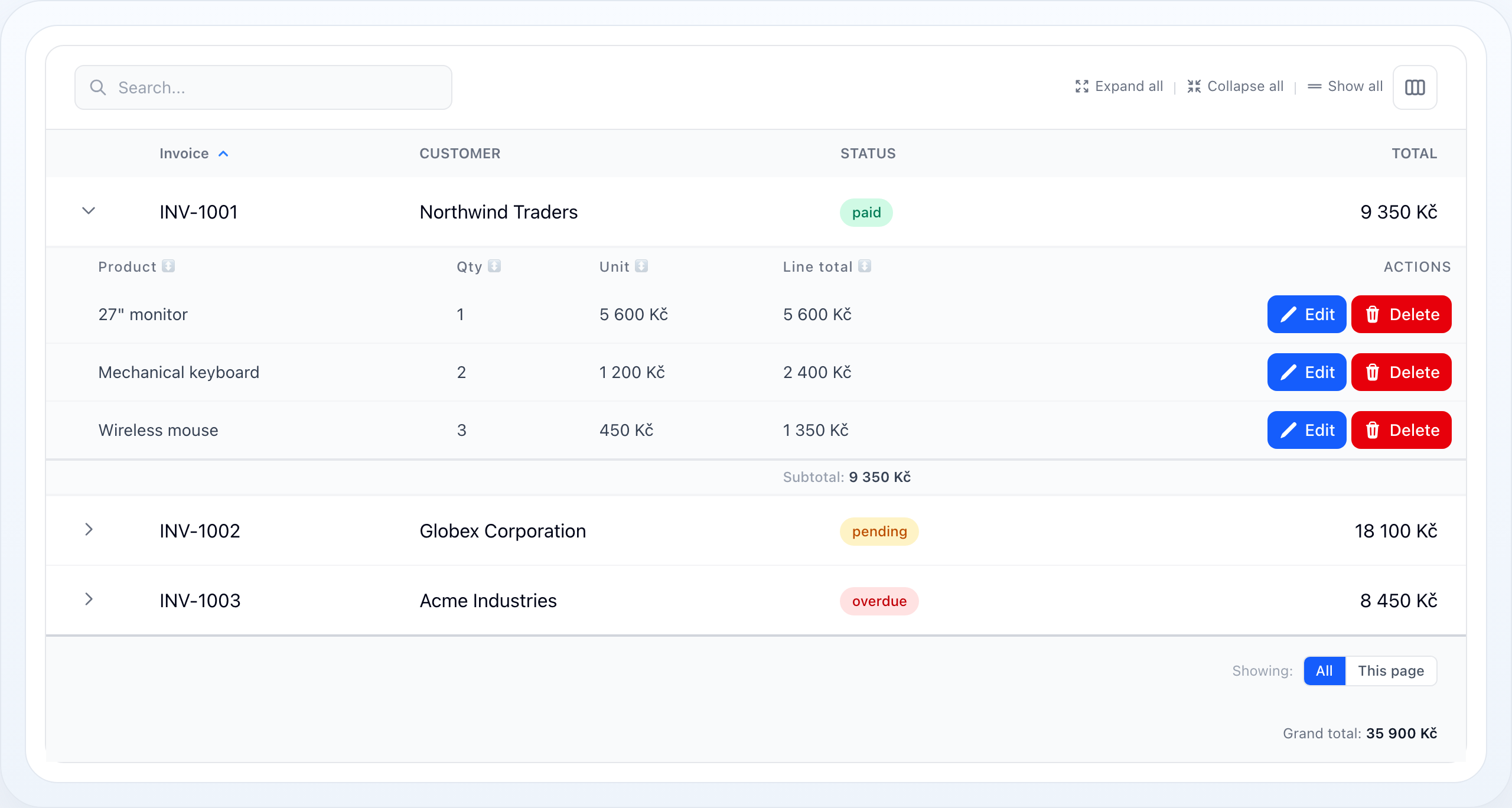
Expanded invoice line items with sortable headers, row actions, and a per-invoice subtotal.
On this page
- Quick Start
- Aggregate Types
- Shortcut Methods
- Typed API
- Scopes
- The Scope Toggle
- Number Formatting
- Custom Formatter
- Conditional Aggregation
- Rollup Columns
- Grand Totals Across All Children
- Grand Totals From Sub-Row Columns
- Custom Closure Summaries
- Multiple Summaries
- How It Is Computed
- Worked Example
- Related Docs
Summaries aggregate a column into a footer value — a sum, an average, a count, and more. They work on the main table, on sub-row tables, and on rollup columns that pull values from a relationship. This page covers every option.
Quick Start
Call ->summarize() (or a shortcut like ->summarizeSum()) on any column. A
footer row appears automatically with the result:
use NyonCode\WireTable\Columns\TextColumn;use NyonCode\WireTable\Table; public function table(Table $table): Table{ return $table ->model(Invoice::class) ->columns([ TextColumn::make('number')->label('Invoice'), TextColumn::make('total') ->money() ->summarizeSum(), // footer: Σ of every filtered invoice ]);}┌────────────┬──────────────┐│ Invoice │ Total │├────────────┼──────────────┤│ INV-1001 │ 9 350 Kč ││ INV-1002 │ 18 100 Kč ││ INV-1003 │ 8 450 Kč │├────────────┼──────────────┤│ Sum: │ 35 900 Kč │└────────────┴──────────────┘Aggregate Types
The first argument to summarize() is the aggregate type — a SummaryType
enum case or its string value. Built-in types:
| Enum case | String | Result | Example output |
|---|---|---|---|
SummaryType::Sum |
sum |
Total of all values | 35 900 |
SummaryType::Avg |
avg |
Mean (rounded to 2 decimals) | 11 966.67 |
SummaryType::Count |
count |
Number of non-null values | 30 |
SummaryType::DistinctCount |
distinctCount |
Number of distinct values | 7 |
SummaryType::Min |
min |
Smallest value | 10 |
SummaryType::Max |
max |
Largest value | 90 |
SummaryType::Range |
range |
"min – max" string |
10 – 90 |
SummaryType::Median |
median |
Middle value (avg of two when even) | 40.0 |
SummaryType::Variance |
variance |
Sample variance (n − 1) | 4.57 |
SummaryType::Stddev |
stddev |
Sample standard deviation | 2.14 |
SummaryType::First |
first |
First value in the set | Alice |
SummaryType::Last |
last |
Last value in the set | Zoe |
| — | Closure |
Custom — fn ($values, $query) => … |
anything |
use NyonCode\WireTable\Columns\SummaryType; TextColumn::make('score') ->summarize(SummaryType::Median) ->summarize('stddev'); // strings are normalized to the enumStrings are validated on the spot — an unknown type throws an
InvalidArgumentException listing the valid values, instead of silently
rendering an empty footer cell.
Shortcut Methods
Each common type has a fluent shortcut that also sets a sensible default label:
| Shortcut | Equivalent |
|---|---|
->summarizeSum() |
->summarize('sum') |
->summarizeAvg() |
->summarize('avg') |
->summarizeCount() |
->summarize('count') |
->summarizeDistinct() |
->summarize('distinctCount') |
->summarizeMin() |
->summarize('min') |
->summarizeMax() |
->summarize('max') |
->summarizeRange() |
->summarize('range') |
->summarizeMedian() |
->summarize('median') |
->summarizeStddev() |
->summarize('stddev') |
Each shortcut accepts an optional label and scope:
->summarizeSum('Grand total', scope: 'query')Typed API
->summarize(string|Closure|SummaryType $type, ?string $label = null, string $scope = 'query', ?Closure $format = null, ?Closure $when = null): static->summaryDecimals(int $decimals, string $decimalSeparator = ',', string $thousandsSeparator = ' '): static->summarizeSum(?string $label = null, string $scope = 'query'): static->summarizeAvg(?string $label = null, string $scope = 'query'): static->summarizeCount(?string $label = null, string $scope = 'query'): static->summarizeDistinct(?string $label = null, string $scope = 'query'): static->summarizeMin(?string $label = null, string $scope = 'query'): static->summarizeMax(?string $label = null, string $scope = 'query'): static->summarizeRange(?string $label = null, string $scope = 'query'): static->summarizeMedian(?string $label = null, string $scope = 'query'): static->summarizeStddev(?string $label = null, string $scope = 'query'): static->hasSummary(): bool->hasSummaryInScope(string $scope): bool->getSummaries(): array$when filters which records enter the aggregate: it may constrain the database
query for the query scope or test each value and record for in-memory scopes.
$format formats the computed result and takes precedence over the default
numeric formatting.
Scopes
scope: decides which records are aggregated.
| Scope | Aggregates over | Computed how |
|---|---|---|
query |
all records matching current filters | SQL SUM()/AVG()/… (efficient) |
page |
only the current page | in-memory from the loaded page |
selection |
only the checked rows | in-memory from the selected models |
subRows |
the children of one parent row | in-memory from the relationship |
TextColumn::make('price')->summarize('sum', scope: 'page');query is the default. It runs a real database aggregate, so it stays fast even
across millions of rows — it never loads them into memory.
On a sub-row column, the scopes split the same way: subRows renders a
per-parent subtotal inside the expanded panel, while query (the default)
renders a grand total of all children across all parents in the main
footer — see Grand totals from sub-row columns.
The Scope Toggle
When more than one scope is available, the footer renders a compact toggle so the user can switch what the totals reflect without you reconfiguring anything:
Showing: [ All ] This page┌────────────┬──────────────┐│ Invoice │ Total ││ … │ … │├────────────┼──────────────┤│ Grand total: 35 900 Kč │└────────────┴──────────────┘All maps to query, This page to page, and Selection only appears while
rows are checked. The active choice is stored in Livewire table state.
Number Formatting
Numeric summaries are formatted with the column's prefix/suffix and, when set,
->summaryDecimals(). Without it, a column that formats its cells with
numeric() or money() formats its totals the same way — the cells and the
footer go through one formatter, so they cannot disagree:
TextColumn::make('total') ->suffix(' Kč') ->summaryDecimals(2) // decimals, comma decimal sep, space thousands sep ->summarizeSum(); // 1234.5 → "1 234,50 Kč"summaryDecimals() takes optional separators:
->summaryDecimals(2, decimalSeparator: '.', thousandsSeparator: ',') // 1,234.50| Configuration | Raw | Rendered |
|---|---|---|
| (none) | 1234.5 |
1234.5 |
->summaryDecimals(2) |
1234.5 |
1 234,50 |
->summaryDecimals(2, '.', ',') |
1234.5 |
1,234.50 |
->prefix("$")->summaryDecimals(2,'.',',') |
1500 |
$1,500.00 |
->suffix(' Kč')->summaryDecimals(2) |
1234.5 |
1 234,50 Kč |
->numeric(2) |
1234.5 |
1 234,50 |
->numeric(2)->summaryDecimals(0) |
1234.5 |
1 235 |
count and distinctCount are never reformatted as decimals — they stay whole
numbers. range is already a formatted "min – max" string.
Custom Formatter
For full control, pass a format closure. It receives the computed value and
wins over the default formatting:
->summarize('sum', format: fn ($value) => '€'.number_format($value, 2));Conditional Aggregation
Restrict which records are aggregated with when:. The predicate differs by scope:
// DB scope (query): receives the query builder->summarize('sum', when: fn ($query) => $query->where('paid', true)) // In-memory (page / selection / subRows): receives (value, record)->summarize('sum', scope: 'page', when: fn ($value, $row) => $row->paid)Only rows where when() returns true are included — for example, summing only
paid invoices while still listing every invoice.
Rollup Columns
A column can pull an aggregate from a relationship and show it per row. These
are computed as efficient withCount / withSum subqueries:
| Method | Cell shows |
|---|---|
->counts('items') |
count of children |
->sums('items', 'price') |
SUM(price) of children |
->averages('reviews', 'rating') |
AVG(rating) of children |
->mins('items', 'price') |
MIN(price) of children |
->maxes('items', 'price') |
MAX(price) of children |
TextColumn::make('items_total') ->sums('items', 'line_total') // per-row: this invoice's item total ->money();Grand Totals Across All Children
Add a summary to a rollup column and the footer shows the grand total of every child across all parents — the sum of the per-row rollups:
TextColumn::make('items_total') ->sums('items', 'line_total') // per-row rollup in the cell ->summaryDecimals(0) ->suffix(' Kč') ->summarizeSum('Grand total'); // footer: every line item, every invoice┌────────────┬──────────────┐│ Invoice │ Items total │├────────────┼──────────────┤│ INV-1001 │ 9 350 Kč │ ← SUM of INV-1001 line items (rollup)│ INV-1002 │ 18 100 Kč ││ INV-1003 │ 8 450 Kč │├────────────┼──────────────┤│ Grand total: 35 900 Kč │ ← SUM across every invoice's items└────────────┴──────────────┘The grand total is aggregated in SQL over the filtered query (the rollup alias is wrapped as a derived table) — parent rows are never loaded into memory, and decimal columns sum at database precision.
Grand Totals From Sub-Row Columns
When the table uses sub-rows, the amount often lives only on
the child rows — there is no parent column to roll up. Give the sub-row
column a query-scoped summary (the default scope) and the grand total of all
children renders in the main footer, no rollup column needed:
->subRows('items')->subRowColumns([ TextColumn::make('product'), TextColumn::make('line_total') ->suffix(' Kč') ->summaryDecimals(0) ->summarizeSum('Subtotal', scope: 'subRows') // per-parent panel footer ->summarizeSum('Celkem'), // main footer grand total])┌───┬────────────┬─────────────┐│ ▸ │ INV-1001 │ … ││ ▸ │ INV-1002 │ … │├───┴────────────┴─────────────┤│ Celkem: 35 900 Kč │ ← all items of all filtered invoices└──────────────────────────────┘The total is computed in SQL over the child table, constrained to the current
parent set, and honours everything the displayed children honour:
Filter::subRows() scoped filters,
subRowQuery(), and the interactive sub-row filter bar. The footer scope
toggle applies too — All totals children of all filtered parents, This page only children of parents on the current page, Selection only children
of checked parents.
Because sub-row columns don't align with the parent grid, these totals render
as full-width footer rows. Only direct parent→child relations (HasMany,
HasOne, and their morph variants) are supported.
Custom Closure Summaries
For anything the built-ins don't cover, pass a closure. It receives a collection
of the column's non-null values and (for query scope) the query builder:
use Illuminate\Support\Collection; TextColumn::make('price')->summarize( fn (Collection $values, $query) => $values->max() - $values->min(), label: 'Spread',);Multiple Summaries
Stack as many summaries on one column as you need — each renders on its own footer row:
TextColumn::make('total') ->money() ->summaryDecimals(2) ->summarizeSum('Grand total') ->summarizeAvg('Average') ->summarizeMax('Largest');How It Is Computed
queryscope uses a real SQL aggregate (SUM,AVG,COUNT,MIN,MAX,DISTINCT COUNT). It clones the filtered query so the table query is untouched, and never loads rows into memory.- Rollup columns at
queryscope wrap the filtered query as a derived table and aggregate the rollup alias in SQL — same guarantee, no row loading, database-precision sums. - Sub-row grand totals run one SQL aggregate per summarized sub-row column over the child table, constrained to the current parent set.
- Statistical types that aren't portable across drivers (
median,variance,stddev,first,last) pull the single column and compute in PHP. page/selection/subRowscompute in memory from already-loaded models — no extra query.- Empty sets return
0forsum/count/distinctCount,–forrange, andnullotherwise.
Worked Example
public function table(Table $table): Table{ return $table ->model(Invoice::class) ->columns([ TextColumn::make('number')->label('Invoice')->sortable(), TextColumn::make('customer')->label('Customer'), BadgeColumn::make('status')->colors([ 'paid' => 'success', 'pending' => 'warning', 'overdue' => 'danger', ]), TextColumn::make('items_count') ->label('Items') ->counts('items') ->summarizeSum('Total items'), TextColumn::make('items_total') ->label('Total') ->sums('items', 'line_total') ->numeric(0) ->suffix(' Kč') ->summaryDecimals(0) ->summarizeSum('Grand total') ->summarizeAvg('Average'), ]) ->searchable() ->paginated(false);}Related Docs
- Sub-Rows — per-parent subtotals and child summaries
- Row Grouping — per-group subtotal rows
- Exports — summaries are appended to CSV/Excel/PDF exports
- Columns
- Table Overview