Table
Wire Table
The table surface: the host trait, the query it builds, and the base configuration every column, filter and action sits on.
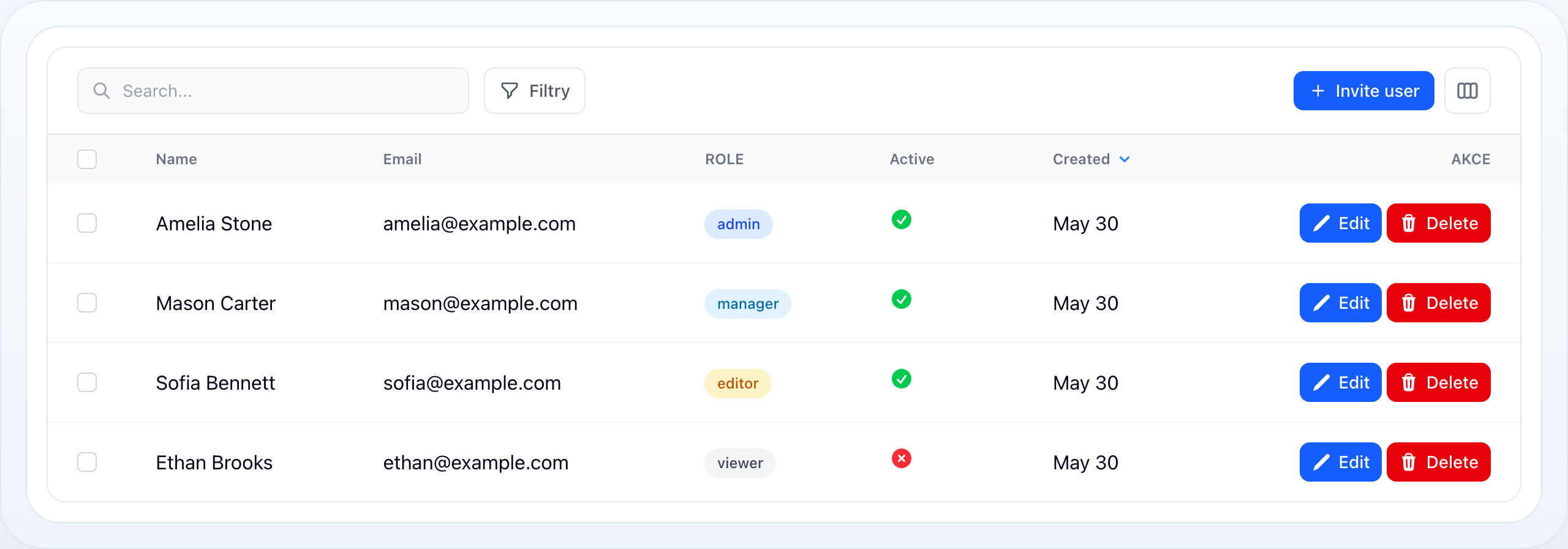
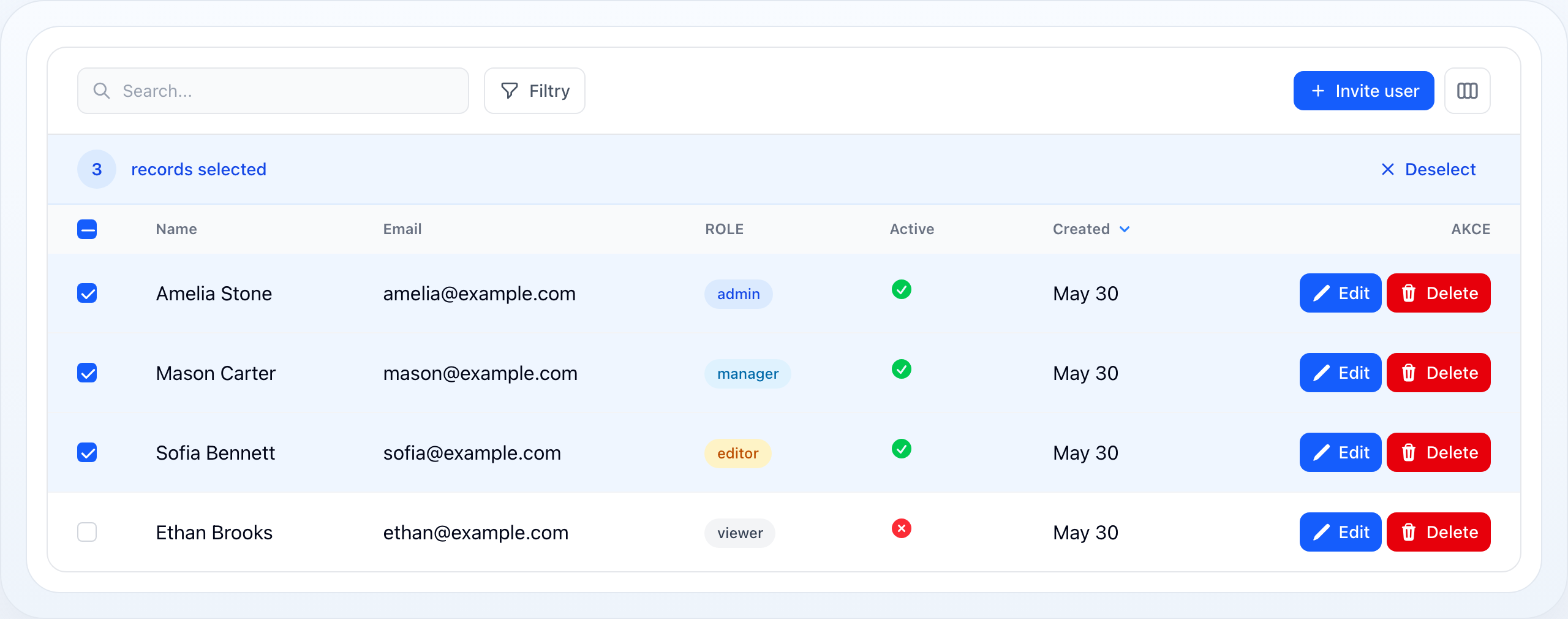
Bulk-selected rows with the active selection toolbar.
On this page
- Installation
- Quick Start
- WithTable Trait
- Public Properties (Livewire State)
- Livewire Methods (wire: callable)
- Table Configuration API
- Data Source
- Columns
- Filters
- Actions
- Search
- Search syntax
- Ranges inside a structured code
- Sorting
- Pagination
- Selection (Bulk Actions)
- Appearance
- Record URL (Clickable Rows)
- Responsive Layout
- Empty State
- Polling (Auto-Refresh)
- Lazy Loading
- Performance
- Notifications
- Debugging
- Inline Editing
- Inline Edit Lifecycle
- Custom Save Logic
- Fill Handle
- Real-World Patterns
- Multi-Tenant Table
- Table with Complex Relations
- Conditional Actions
- Dynamic Per-Page with URL Sync
- Adjusting A Table You Do Not Own
- Related Documentation
Enterprise-grade Livewire table component for Laravel. Depends on wire-core and wire-forms.
Installation
composer require nyoncode/wire-tableAdd to Tailwind content paths:
module.exports = { content: [ // ... './vendor/nyoncode/wire-core/resources/views/**/*.blade.php', './vendor/nyoncode/wire-forms/resources/views/**/*.blade.php', './vendor/nyoncode/wire-table/resources/views/**/*.blade.php', ],}Publish config (optional):
php artisan vendor:publish --tag=wire-table::configQuick Start
use Livewire\Component;use NyonCode\WireTable\Concerns\WithTable;use NyonCode\WireTable\Table;use NyonCode\WireTable\Columns\TextColumn;use NyonCode\WireTable\Columns\BadgeColumn;use NyonCode\WireTable\Filters\SelectFilter;use NyonCode\WireCore\Actions\Action;use NyonCode\WireCore\Actions\DeleteAction;use NyonCode\WireCore\Actions\DeleteBulkAction; class UserTable extends Component{ use WithTable; public function table(Table $table): Table { return $table ->model(User::class) ->columns([ TextColumn::make('name') ->sortable() ->searchable() ->weight('bold'), TextColumn::make('email') ->searchable() ->copyable() ->copyMessage('Email copied!'), BadgeColumn::make('role') ->colors([ 'admin' => 'primary', 'editor' => 'success', 'viewer' => 'gray', ]), TextColumn::make('created_at') ->dateTime('d.m.Y') ->sortable() ->size('sm') ->textColor('gray'), ]) ->filters([ SelectFilter::make('role') ->options([ 'admin' => 'Admin', 'editor' => 'Editor', 'viewer' => 'Viewer', ]), ]) ->actions([ Action::make('edit') ->icon('pencil') ->url(fn (User $r) => route('users.edit', $r)), DeleteAction::make(), ]) ->bulkActions([ DeleteBulkAction::make(), ]) ->defaultSort('name') ->searchable() ->paginated() ->striped() ->hoverable(); } public function render() { return view('livewire.user-table'); }}{{-- resources/views/livewire/user-table.blade.php --}}<div> {{ $this->table }}</div>That's it. The table handles search, sort, filter, pagination, actions, and inline editing — all with zero JavaScript configuration.
WithTable Trait
The WithTable trait is the Livewire integration layer. It provides:
- All Livewire-bound public properties (search, sort, filters, pagination, selection)
- Lifecycle hooks (
mountWithTable, property watchers) - Query building via
TableQueryService - Action execution pipeline
- Inline editing pipeline
- Modal management
- Row expansion (sub-rows)
- Column visibility toggling
- SQL/query debugging
Public Properties (Livewire State)
These are automatically synced with the browser via Livewire:
| Property | Type | Default | Description |
|---|---|---|---|
$tableSearch |
?string |
null |
Current search term |
$tableSortColumn |
string |
'' |
Current sort column name |
$tableSortDirection |
string |
'asc' |
'asc' or 'desc' |
$tablePerPage |
int |
10 |
Records per page |
$tableFilters |
array |
[] |
Active filter values: ['role' => 'admin', ...] |
$columnFilters |
array |
[] |
Column-level filter values |
$selectedRecords |
array |
[] |
Primary keys of selected records |
$hiddenColumns |
array |
[] |
Column names hidden by user |
$expandedRows |
array |
[] |
Primary keys of expanded rows (sub-rows) |
$flattenMode |
bool|null |
null |
Expansion baseline (null = follow subRowsDefaultExpanded()) |
Livewire Methods (wire: callable)
These are called from Alpine.js or Livewire directives in the Blade views:
| Method | Called When |
|---|---|
sortTable($column) |
User clicks column header |
resetSort() |
User resets sort |
updatedTableSearch($value) |
Search input changes |
updatedTableFilters() |
Filter value changes |
updatedColumnFilters() |
Column filter changes |
updatedTablePerPage() |
Per-page selector changes |
toggleColumnVisibility($name) |
User hides/shows column |
selectRecord($key) |
Checkbox toggled |
selectAll() |
"Select all" toggled |
deselectAll() |
"Deselect all" clicked |
expandRow($key) |
Row expand/collapse |
toggleAllRowExpansion() |
Master expand/collapse — moves the expansion baseline |
executeAction($name, $key) |
Action button clicked |
executeBulkAction($name) |
Bulk action clicked |
updateCell($column, $key, $value) |
Inline edit committed |
confirmActionExecution() |
Modal "confirm" clicked |
cancelAction() |
Modal "cancel" clicked |
submitActionForm() |
Action form submitted |
Table Configuration API
The Table class provides a comprehensive fluent API. Below is the complete reference.
Data Source
// From Eloquent model class (auto-creates query)->model(string $modelClass) // Custom base query (overrides model)->query(Builder $query) // Modify the auto-generated query->modifyQueryUsing(Closure $fn) // Primary key column (default: 'id')->primaryKey(string $column)Examples:
// Simple model$table->model(User::class); // Custom query with eager loads and scopes$table->query( User::query() ->where('tenant_id', auth()->user()->tenant_id) ->withCount(['posts', 'comments']) ->with(['department', 'team'])); // Modify auto-query$table->model(User::class) ->modifyQueryUsing(fn (Builder $q) => $q->where('active', true)); // UUID primary key$table->model(Order::class)->primaryKey('uuid');Columns
->columns(array $columns)See Columns Reference for all 19 column types.
Filters
->filters(array $filters)See Filters Reference for all filter types.
Actions
// Row actions (per-record)->actions(array $actions) // Bulk actions (for selected records)->bulkActions(array $actions) // Header actions (table-level, no record context)->headerActions(array $actions) // Actions column position->actionsPosition(string 'start'|'end') // default: 'end' // Actions column alignment->actionsAlignment(string 'left'|'center'|'right') // Actions column header label->actionsColumnLabel(string $label) // Actions column fixed width->actionsColumnWidth(string $width) // e.g., '120px' // Keep the actions column at the table's edge while the rest scrolls sideways // ->stickyActions(bool $sticky = true)Pinned actions column. stickyActions() is the horizontal twin of
stickyHeader(): the actions column stays against the edge of the table while
the columns beside it travel underneath it. Which edge is not a second option —
the column pins to the side it already sits on, so it follows
actionsPosition(), and a table wide enough to scroll is the only one where any
of it shows.
The interesting part is that a pinned cell is transparent by default, so the columns it is meant to stay in front of would scroll straight through it. It is drawn as three layers instead: the cell takes the row's own background colour, an opaque surface is painted over that, and the row's colour is inherited back on top of the surface. That is what keeps the stripe, the hover tint and the selection visible inside the pinned column while everything else disappears behind it — the pane is part of the row, not a panel stuck beside it.
->actions([Action::make('edit'), DeleteAction::make()])->stickyActions() // pinned right, following actionsPosition() ->actionsPosition('start')->stickyActions() // now pinned left, divider on the other sideOne thing it deliberately does not cover: a full-width row — a group header, an expanded sub-row panel, the empty state, a grand-total line — has no cell in the actions column, so nothing is pinned on it and its content scrolls through the pane's track.
See Actions for the full Actions API.
Search
// Enable global search across all searchable columns->searchable(bool $searchable = true) // Configure how the typed term is interpreted (see below)->search(Closure|SearchConfig $config)By default the term is split into words and every word must match, each in
any searchable column: novak praha keeps the row whose name holds novak and
whose city holds praha, in whichever order they were typed. Each word is a
LIKE '%word%' on MySQL/MariaDB and SQLite and an ILIKE on PostgreSQL. The %
and _ a user types are escaped, so they are searched for rather than acting as
wildcards.
Case and accents follow the connection's collation: under MySQL's
utf8mb4_unicode_ci novak finds Novák. A table over a
CollectionDataSource, which has no collation, folds both
sides itself and matches the same way. The palette (⌘K), a relationship select
and every list filtered in the browser — select options, a checkbox list, the
admin menu — read a term by the same rule.
Search syntax
Splitting on spaces is on unless a table says otherwise; ranges and wildcards are opted into per table, because both read meaning into characters an ordinary search may contain.
use NyonCode\WireCore\Core\Query\Search\SearchConfig; $table->search(fn (SearchConfig $s) => $s ->ranges() // >100, <=20, 10..20, 2026-01-01..2026-03-31 ->wildcards() // nov* matches novak);| Capability | What the user can type | What it does |
|---|---|---|
tokenize() (default) |
Ada Lovelace |
Every word must match, each across all columns — so a first name in one column and a surname in another match together. |
tokenize() (default) |
"Ada Lovelace" |
A quoted phrase stays one word and is never read as an operator. |
ranges() |
>100, >=100, <10, <=10, =42 |
Compares against columns that hold a number or a date. |
ranges() |
10..20, 10.., ..20 |
A closed or open-ended range. |
ranges() |
2026-01-01..2026-03-31, 31.01.2026 |
The same over dates. |
ranges() |
8866 01..08 |
A range inside one series of a structured code — see below. |
wildcards() |
nov*, a?b |
* stands for any run of characters, ? for exactly one. |
literal() |
Ada Lovelace |
Switches everything off: the whole term is one substring, as typed. |
A typed date is read at the granularity it was written: 2026-01-31 means that
whole day, 2026-01 that month and 2026 that year — so <=2026-01-31 still
includes a row placed at 23:30 on the 31st.
Comparisons are only ever asked of a column that can answer them. The value type
is inferred from the model's casts (decimal:2, datetime, …); where the casts
cannot speak for a column, declare it with
Column::searchAs(). A comparison no column can
answer — >100 on a table of names — is searched as the literal text that was
typed rather than silently matching everything.
// Only `amount` can answer ">1000"; the words narrow it further.$table->search(fn (SearchConfig $s) => $s->tokenize()->ranges()); // User types: praha >1000// Rows kept: something contains "praha" AND amount > 1000Ranges inside a structured code
A code such as 8866 01, 8866 02, … shares a series and ends in a padded
number. Declare the column with
searchAs('code') and the sequence can be ranged
over directly:
$table ->searchable() ->search(fn (SearchConfig $s) => $s->tokenize()->ranges()) ->columns([ TextColumn::make('reference')->searchable()->searchAs('code'), ]); // User types: 8866 01..08// SQL: reference BETWEEN '8866 01' AND '8866 08'Both halves are required: searchAs('code') says what the column holds,
ranges() is what lets a range be typed at all, and tokenize() is what splits
the series from the sequence. A declaration the search box cannot ask for is
refused when the table renders — with ranges() off, 8866 01..08 would
otherwise be looked for as literal text and the table would come back empty with
nothing on screen to explain it.
The space inside the code is also what splits the term, so 8866 01..08
arrives as the word 8866 and the range 01..08. The range carries the word
directly before it, and a code column completes both bounds with it — write the
series once, not on both sides. Every other column ignores the word and reads
01..08 as the plain range it is, so praha 10..20 still means "contains praha,
amount between 10 and 20" on the same table. One-sided comparisons work the same
way: 8866 >=09.
Two rules keep it honest:
- The number must be stored padded, and typed the way it is stored.
Comparing as text is only correct while the width is constant (
01 … 08sorts alphabetically in the same order it sorts numerically;9 … 10does not). A range is compared at the width it was typed, so1..8against stored01 … 08isBETWEEN '8866 1' AND '8866 8'and matches by text — it misses the whole padded series and reaches8866 12instead. A range typed across a width boundary is completed for you —8866 50..100is read as050..100, since a hundredth member can only exist in a three-digit series. - The series is the one word before the range.
faktura 8866 01..08ranges inside8866and requiresfakturaseparately; a code containing two spaces is out of reach.
Search combines with filters (AND), is reset to page one when it changes, and is
persisted in the URL when queryString() is on.
Sorting
// Enable column header sorting->sortable(bool $sortable = true) // Default sort on initial load->defaultSort(string $column, string $direction = 'asc')Every table query ends with the primary key as a tiebreaker, in whichever
direction is already in force. A page is a slice of an ordering, so without one
the slice is undefined: two rows the sort calls equal can come back in either
order, and on PostgreSQL — where an UPDATE rewrites the row at the end of the
heap — editing a row on page one pushes an unseen record past the start of page
two. The tiebreaker is skipped where a key is not a legal ordering term:
GROUP BY, DISTINCT and unions.
Pagination
// Enable pagination->paginated(bool $paginated = true) // Default per-page count, a positive int (default: wire-table.defaults.per_page)->perPage(int $perPage) // Per-page dropdown options (default: wire-table.defaults.per_page_options)->perPageOptions(array $options)->perPageSelector(bool $show = true) // draw the page-size control at all // // Simple pagination — no COUNT(*) query, just Previous/Next->simplePagination() // Cursor pagination — offset-free, constant-time->cursorPagination() // Standard pagination (default) — full page numbers->standardPagination()When to use which:
| Mode | Best For | Trade-offs |
|---|---|---|
| Standard | < 100k records, users need page numbers | COUNT(*) on every page load |
| Simple | 100k-1M records, sequential browsing | No total count, no page numbers |
| Cursor | > 1M records, real-time data | No random page access, opaque cursors |
perPageOptions() always offers the configured perPage(), so
->perPage(3) against the default options renders a select that can actually
show 3 instead of contradicting the rows on screen. A per-page value arriving
from the client that the table does not offer falls back to perPage().
Out-of-range pages re-anchor themselves. Standard pagination clamps to the
last populated page whenever the stored page points past the end of the result
set — a shared ?page=5 link, a filter that shrank the set, rows deleted by
somebody else — so a page that no longer exists never renders as an empty
table. Simple and cursor pagination have no total to clamp against and are left
as-is.
Selection (Bulk Actions)
// Enable checkbox selection column->selectable(bool $selectable = true)When enabled, checkboxes appear. Selected record keys are stored in tableState.selection.records (legacy alias $selectedRecords). Bulk actions operate on the selection.
Selection is managed client-side (Alpine) — checking rows, select-all, and the selection bar react instantly without a server roundtrip. The state syncs with the next request, so bulk actions always see the current selection; tables with a summary footer commit selection changes automatically (debounced) so selection-scope totals stay live.
Appearance
// Alternating row colors->striped(bool $striped = true) // Row hover highlight (default: true)->hoverable(bool $hoverable = true) // Reduced cell padding->compact(bool $compact = true) // Table/cell borders->bordered(bool $bordered = true) // Keep the column headers in view while the rows scroll under them // ->stickyHeader(bool $sticky = true, ?string $maxHeight = null) // Custom CSS class on <table> element->tableClass(string $class) // Custom CSS class on <thead>->headerClass(string $class) // Custom CSS class on <tr>, static or computed per record->rowClass(string|Closure $class) // Tint the whole row with a semantic color, static or computed per record->rowColor(string|Closure|null $color) // Mark records inactive: dimmed, optionally struck through, and not writable->rowInactive(bool|Closure $when = true, Closure|InactiveRow|null $configure = null)Sticky header. stickyHeader() keeps the column labels readable through a
long list. By default the header pins to the page: scroll the page and it stays
at the top of the window, sliding along with the rows, until the last row goes
past. CSS position: sticky cannot do that on its own here — a sticky element
pins to its nearest scrolling ancestor, and the table's wrapper is one: it
carries overflow-x: auto for the horizontal case, and CSS computes the other
axis to auto alongside it. That wrapper never scrolls vertically, so the
<thead> is moved instead, by a scroll-driven animation the page's own scroll
runs — in the same frame as the rows, without a scroll listener trailing a frame
behind them (a browser without scroll timelines gets that listener as a
fallback). It stays inside the wrapper, so a table wider than the page still
scrolls sideways with its header.
Sticky chrome over the top of the page — a top bar — would otherwise cover the
pinned header. Declare its height as --wire-sticky-top on any ancestor and the
header stops below it; the admin layout does that for its own top bar.
Name a height instead, and the table becomes its own scroll region: the rows scroll inside a box of that height and the header pins to the top of the box.
->stickyHeader() // pinned to the page->stickyHeader(maxHeight: '32rem') // the rows scroll in a 32rem boxThe height is written as an inline max-height, not a class, so an arbitrary
length needs nothing from Tailwind's extractor. Turning the header off with
stickyHeader(false) lifts the cap with it, whatever height was named.
Scroll edges. A region that clips does it in silence — overflow draws
nothing at the edge it cuts, so a table three screens wide looks, at rest,
exactly like a table that fits: a whole actions column off-screen with no sign
that it is there, and, under a sticky header, a last visible row sliced through
the middle with nothing to say more follow.
What says so is the region's own scrollbar, and the framework's only part in it
is to stop the platform hiding one. macOS and iOS draw an overlay scrollbar
that fades out a second after the last scroll, so a table nobody has touched
shows nothing at all — the one moment the hint is needed. The scroll region
declares ::-webkit-scrollbar, which is what opts an element out of the overlay
scrollbar and back onto a classic one: painted for as long as the content
overflows, absent when it does not. It takes no configuration, and a table that
fits shows none.
That is deliberately a scrollbar and not a shading over the edges, which is what earlier versions drew. A gradient says only there is more; a scrollbar says how much more, where in it you are, and moves the table when you drag it. It also dims nothing — the three overlays sat over the pinned header row, the rules between rows and the first characters of the first column.
A table cut on the horizontal axis can also keep one column in view rather than
only marking the cut — see stickyActions() under Actions.
Conditional row color. rowColor() tints an entire row using the same
semantic palette as badges and every other surface (success, warning,
danger, info, primary, gray, or any raw Tailwind hue). Return null
from the Closure to leave a row untinted. A tinted row automatically gets a
matching same-hue hover and drops the neutral hover/zebra striping, so the
color always reads cleanly:
->rowColor(fn (Invoice $record) => match ($record->status) { 'overdue' => 'danger', 'pending' => 'warning', 'paid' => 'success', default => null,})Prefer rowColor() over hand-written background classes — it resolves through
the canonical HasColor owner, so it stays consistent with the rest of the UI
and works in light and dark mode. Use rowClass() when you need arbitrary
utilities (font weight, ring, opacity) rather than a background tint; both can
be combined on the same table:
->rowColor(fn (Invoice $r) => $r->isOverdue() ? 'danger' : null)->rowClass(fn (Invoice $r) => $r->isOverdue() ? 'font-semibold' : null)Inactive records. A cancelled, voided or archived record stays in the list
and stops being writable: rowInactive() dims the row, locks every inline
editor on it — server-side, so a forged write is refused too — and optionally
strikes its text through or tints it. Its actions, its checkbox and a click that
opens it keep working unless you say otherwise:
->rowInactive( fn (Invoice $r) => $r->status === 'cancelled', fn (InactiveRow $row) => $row->strikethrough()->color('danger'),)The whole state, including the two optional locks, is in Inactive Records.
Record URL (Clickable Rows)
// Make entire row clickable — '{id}' in a string is the record's key->recordUrl(string|Closure $url, ?bool $navigate = null)// With Closure->recordUrl(fn (User $record) => route('users.show', $record)) // A full page load for these links, whatever wire-core.navigate says->recordUrl(fn (User $record) => route('users.show', $record), navigate: false) A record link to a page of this application is followed with wire:navigate
when wire-core.navigate is on; navigate is the links' own say — see
Configuration → Navigation.
Responsive Layout
->layout(TableLayout|string $layout) // 'table' (default) | 'list' — rows, or cards at every width // ->listHeading(?Closure $heading) // fn ($record) => 'Today' — day dividers for the list layout // Stack columns vertically on mobile; 2nd arg is the breakpoint (default 'md')->stackedOnMobile(bool $stacked = true, string $breakpoint = 'md') // 'sm','md','lg','xl'->bulkMaxRecords(?int $max) // rows one bulk action may load (default 1000, null = no cap)->mobileCard(Closure $callback) // name the card's title/subtitle/metric/meta // Collapse the mobile card's row actions into one dropdown group (from N actions up)->collapseActionsOnMobile(bool $collapse = true, int $threshold = 3) // The same for the toolbar's header actions, below the table's mobileBreakpoint()->collapseHeaderActionsOnMobile(bool $collapse = true, int $threshold = 2, string|false|null $label = null, string|Icon|null $icon = null)Empty State
->emptyState(?string $heading = null, ?string $description = null, ?string $icon = null)$table->emptyState( heading: 'No users found', description: 'Try adjusting your filters or search term.', icon: 'users',)Empty State Actions
Offer a way out of the empty state — usually "create the first record":
->emptyStateActions(array $actions)$table ->emptyState( heading: 'No posts yet', description: 'Write the first one.', icon: 'document-text', ) ->emptyStateActions([ Action::make('create') ->label('Create post') ->url(route('posts.create')), ]);Both Action and HeaderAction are accepted. The empty state has no rows, so
its actions run record-less — the same way header actions do, modal, form and
confirmation included:
->emptyStateActions([ Action::make('create') ->label('Create post') ->form(fn () => Form::make()->schema([ TextInput::make('title')->required(), ])) ->action(fn (array $data) => Post::create($data)),])Two things follow from being record-less:
- Only a static
->url('/posts/create')resolves. A per-record closure (->url(fn ($record) => …)) has no record here and is left unset, so the action renders as a plain button. - Give an empty-state action a name of its own. Reusing the name (or the
object) of a header action renders both when the table is empty — a duplicate
data-testid, and if the action carries a->keyboardShortcut(), a window listener registered twice, so one keypress fires it twice.
These actions are not shown when a filter emptied the table: there the records exist behind the filter, so the empty state offers to clear it instead.
Polling (Auto-Refresh)
// Enable polling at interval->poll(string $interval = '5s') // Continue polling when browser tab is hidden->pollKeepAlive(bool $keepAlive = true) // Only poll when element is visible in viewport->pollOnlyVisible(bool $onlyVisible = true) // Conditional polling->pollWhen(Closure $condition) // Livewire method to call on poll (default: re-render)->pollMethod(string $method)// Poll every 5s while there are pending jobs$table->poll('5s') ->pollWhen(fn () => Job::where('status', 'pending')->exists());Lazy Loading
// Defer initial table render->lazy(bool $lazy = true) // Placeholder HTML during loading->lazyPlaceholder(string $html)$table->lazy() ->lazyPlaceholder( '<div class="flex items-center justify-center p-12"> <x-wire::icon name="refresh" class="w-8 h-8 animate-spin text-gray-400" /> </div>' );Performance
// Cache query results->cacheQuery(int $ttl, ?string $key = null) // Process records in chunks (for bulk operations)->chunk(int $size, Closure $callback) // Answer a write with the regions it moved — the row, its card, the totals,// its group's subtotal — instead of re-rendering the table->rowPartials(bool $condition = true)->usesRowPartials(): bool// Cache for 60 seconds — key auto-generated from state hash$table->cacheQuery(60); // Custom cache key$table->cacheQuery(300, 'users-table'); // A cell save answers with that row (49.3 ms → 3.2 ms on a 25×20 page). The row// keeps its position until the next full render — see Advanced → Row Partials.$table->rowPartials();Notifications
// Override notification driver for this table->notificationDriver(string $driver)Debugging
// Get the QueryPlan object for inspection->debugQueryPlan(): QueryPlan // Get raw SQL with bindings interpolated->toSql(): string // Get column metadata analysis->getColumnsInfo(): array->getDatabaseColumns(): array->getDatabaseColumnsInfo(): arrayInline Editing
Three column types support inline editing — cells become editable inputs that validate and save immediately:
| Column Type | UI Element | Saves On |
|---|---|---|
TextInputColumn |
<input> |
Blur or Enter |
SelectColumn |
<select> |
Change |
ToggleColumn |
Switch | Click |
use NyonCode\WireTable\Columns\TextInputColumn;use NyonCode\WireTable\Columns\SelectColumn;use NyonCode\WireTable\Columns\ToggleColumn; $table->columns([ TextInputColumn::make('name') ->rules(['required', 'string', 'max:255']) ->saveOnBlur(), SelectColumn::make('status') ->options([ 'draft' => 'Draft', 'review' => 'In Review', 'published' => 'Published', ]) ->editableRules(fn (): array => ['required', 'in:draft,review,published']), ToggleColumn::make('is_featured') ->onColor('success') ->offColor('gray') ->disabled(fn ($record) => ! $record->is_published),]);Inline Edit Lifecycle
- User modifies cell value
updateCell($column, $recordKey, $newValue)is called- Validation runs against column rules
- Event
CellUpdatingdispatched (can be listened to) - Eloquent update persists the new value
- Event
CellUpdateddispatched - Success notification shown
If validation fails, the cell reverts and shows an error message.
Custom Save Logic
TextInputColumn::make('name') ->rules(['required', 'string', 'max:255']) ->editableUsing(function (Model $record, string $column, mixed $value) { // Custom save logic $record->update([$column => Str::title($value)]); Cache::forget("user:{$record->id}"); })Fill Handle
Table::fillHandle() adds an Excel-style handle to editable cells: drag a value
down over the rows below and the whole range is written in one request. Opt-in,
with Column::fillable(false) to exclude a column. See
Fill Handle.
Real-World Patterns
Multi-Tenant Table
public function table(Table $table): Table{ return $table ->query( Order::query()->where('tenant_id', auth()->user()->tenant_id) ) ->columns([...]) ->filters([...]);}Table with Complex Relations
$table->model(Invoice::class) ->columns([ TextColumn::make('number')->searchable(), TextColumn::make('client.company.name') // nested relation ->label('Company') ->searchable(), TextColumn::make('items.sum.amount') // aggregate ->label('Total') ->money('CZK'), TextColumn::make('payments.count') // count aggregate ->label('Payments'), BadgeColumn::make('status') ->colors([...]), ]);Conditional Actions
$table->actions([ Action::make('approve') ->icon('check') ->color('success') ->visible(fn ($record) => $record->status === 'pending') ->action(fn ($record) => $record->approve()), Action::make('edit') ->icon('pencil') ->disabled(fn ($record) => $record->is_locked) ->url(fn ($record) => route('invoices.edit', $record)), ActionGroup::make('more', [ Action::make('duplicate') ->icon('copy') ->action(fn ($r) => $r->replicate()->save()), Action::make('pdf') ->icon('document') ->url(fn ($r) => route('invoices.pdf', $r), openInNewTab: true), Action::divider(), Action::make('delete') ->icon('trash') ->color('danger') ->requiresConfirmation() ->modalHeading('Delete Invoice?') ->action(fn ($r) => $r->delete()), ]),]);Dynamic Per-Page with URL Sync
All state properties are Livewire-bound, so they persist across page loads via query string (if configured in your Livewire component):
class UserTable extends Component{ use WithTable; // Persist state in URL protected $queryString = [ 'tableSearch' => ['except' => ''], 'tableSortColumn' => ['except' => ''], 'tableSortDirection' => ['except' => 'asc'], 'tablePerPage' => ['except' => 10], ];}Adjusting A Table You Do Not Own
Four plugin hooks fire around a table, and which one you want depends on what you are changing — the pair at the top is not two names for one moment:
| Hook | Runs on | Reach for it to |
|---|---|---|
table.composing |
the composed Table instance, once per host |
add or remove a column or filter |
table.configuring |
the arrays TableQueryService is about to hand the planner |
steer what is searched and sorted |
table.querying |
after the plan is built, before it runs | force a sort, inspect the plan |
table.queried |
after every pipe has applied | observe the finished query |
$manager->hook(Hook::TableComposing, function (TableComposingPayload $payload) { $payload->columns = [...$payload->columns, TextColumn::make('internal_note')]; return $payload;}, for: 'invoices');A column added through table.configuring is never rendered. That hook runs
inside the query service on the planner's copy, so the column is searched and
sorted on and never drawn — which is the whole reason table.composing exists. It
runs on the instance the host built, next to the line that gives the table its
component, so a column added there is a column the user sees.
for: narrows a callback to one table: the registered key of the resource a page
shows, the host component's class, or the model. Without it a callback runs for
every table in the application. See Hooks.
Related Documentation
| Document | What It Covers |
|---|---|
| Columns | All 19 column types — TextColumn, BadgeColumn, BooleanColumn, IconColumn, ImageColumn, ButtonColumn, ToggleColumn, SelectColumn, TextInputColumn, CheckboxColumn, StackedColumn, SplitColumn, TagsColumn, ColorColumn, MoneyColumn, MetricColumn, PhoneColumn, RatingColumn, PollColumn |
| Filters | SelectFilter, DateFilter, NumberRangeFilter, TernaryFilter, custom filters, column-level filters |
| Exports | CSV, Excel, and PDF exports for the current table query |
| Imports | CSV imports — header mapping, casting, per-row validation, updateExisting |
| Relation Managers | Relationship-scoped tables as standalone Livewire components |
| Advanced | Sub-rows, summary footer, polling, lazy loading, caching, debug, responsive |
| Selecting Rows | Checkboxes, select-all-matching, and the selection gestures |
| Record Actions | Whole-row click, double-click, right-click and key bindings |
| The Gesture Layer | gestures() — the opt-in keyboard/drag layer, and the mobile button fallback |
| Actions | Full Action system — modals, forms, wizard steps, lifecycle |