Forms
Builder
A list whose every item picks its own block type and schema — where a repeater repeats one shape, a builder chooses among several.
On this page
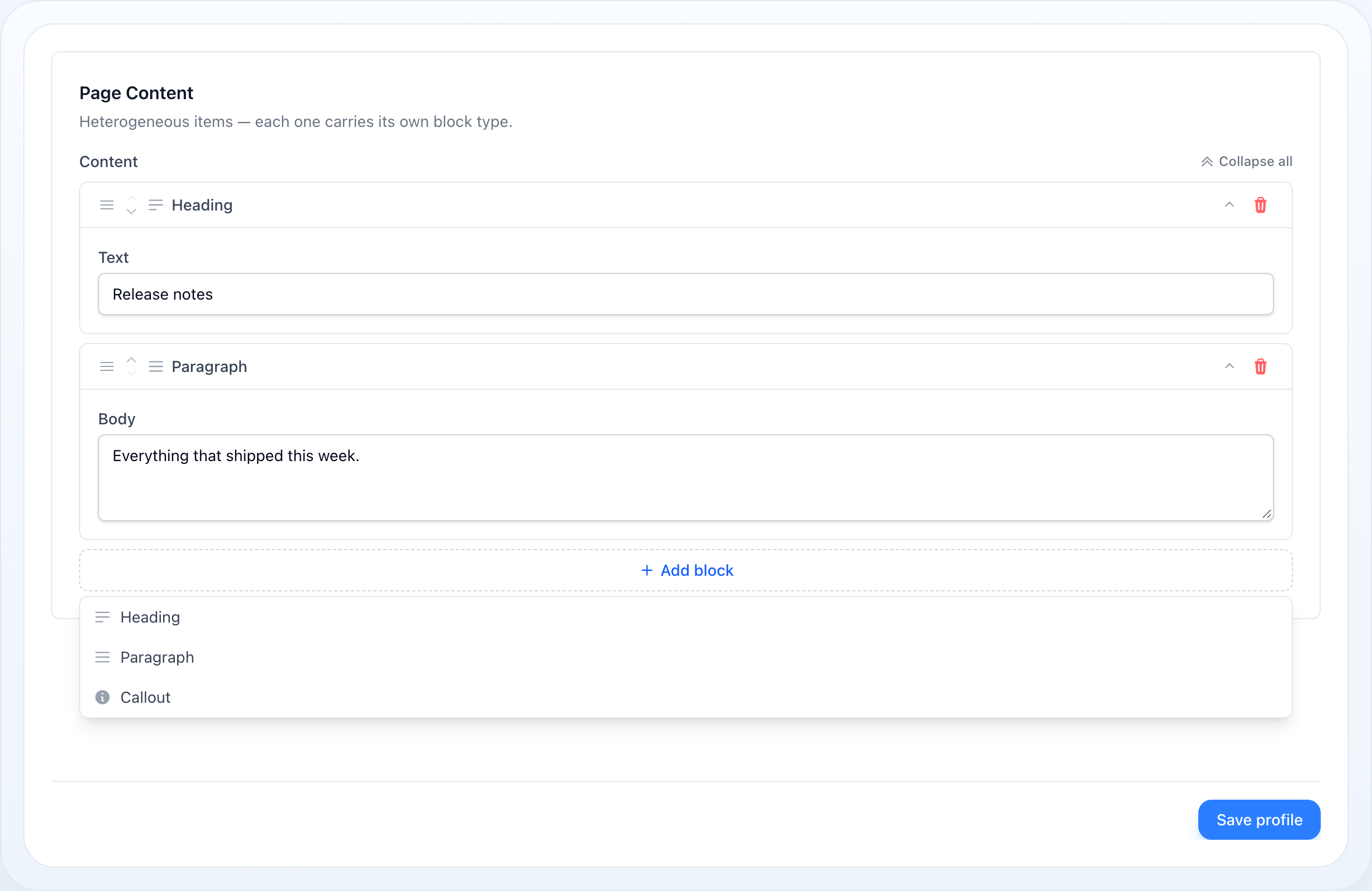
Block builder for heterogeneous content: a list of items where each item picks its own block type and is edited with that block's schema. Where a Repeater repeats one schema, a Builder chooses among several — the shape behind a page builder, a landing page, an article body made of headings, paragraphs, images and callouts.
use NyonCode\WireForms\Components\Builder;How It Works
Every item is a type plus its data. The builder's state is a plain list:
[ ['type' => 'heading', 'data' => ['text' => 'Hello']], ['type' => 'paragraph', 'data' => ['body' => 'World']],]type names one of the declared blocks, data holds that
block's fields. Nothing else is stored — no labels, no icons, no schema. That is
what keeps the content readable by code that knows nothing about the form: the
page that renders it needs only the two keys.
An item's fields are chosen by its type, on every render. For item $i,
getItemSchema($i, $type) looks the stored type up with getBlock(), clones that
block's schema and re-binds it under <statePath>.<i>.data, so
TextInput::make('text') in item 0 binds content.0.data.text. Reactivity
follows the repeater's rules: $get/$set, afterStateUpdated() and live
validation resolve against that one item.
Adding is a Livewire call carrying the chosen block. The "add" trigger only
opens the picker — that part is Alpine, no roundtrip. Choosing a block calls
addBuilderItem($statePath, $block), which appends ['type' => $block, 'data' => []] on the server, and the re-render draws the new item with its block's
schema. Remove, duplicate and move are the repeater's own endpoints, unchanged.
A new item starts empty. addBuilderItem() appends data => [], and a field
added to a block later is simply absent from items saved before it. Code that
reads the content must treat every key in data as optional.
The trap: a stored type is not a declared type. addBuilderItem() appends
whatever block name it is handed, and stored content outlives the code that
declared it — a block renamed or removed next month still sits in last month's
rows. The form copes: an unknown type renders its
header and no fields. Your rendering code must cope too, which is why every
example below maps known types and skips the rest rather than turning type
straight into a view name.
Basic Usage
use NyonCode\WireForms\Components\Block;use NyonCode\WireForms\Components\Builder; Builder::make('content') ->blocks([ Block::make('heading')->icon('star')->schema([ TextInput::make('text')->rules(['required']), ]), Block::make('paragraph')->schema([ Textarea::make('body'), ]), Block::make('image')->schema([ FileUpload::make('file'), TextInput::make('alt'), ]), ]) ->reorderable()The "add" trigger opens a picker listing every declared block; choosing one
appends an item of that type. Cast the attribute to array (or json) on the
model — the builder is stored as one JSON column, never through a relation.
Declaring Blocks
A block is a name, a label, an optional icon and the schema its items are edited
with. The name is what gets stored as type, so treat it like a column name:
renaming it orphans every item already saved under the old one.
Block::make('callout') ->label('Callout box') // picker entry and item header — default: from the name ->icon('information-circle') // shown in both ->schema([ Select::make('tone')->options(['info' => 'Info', 'warning' => 'Warning']), TextInput::make('title'), Textarea::make('body')->rows(2), ])A block's schema may use any field and any layout component — a Grid of two
inputs, a Section inside a block — and its rules are collected through the
layout the same way a form's are.
A Block is a definition, not a rendered surface: placing one directly in a form
schema throws a FormConfigurationException.
Naming Items
Builder::make('content') ->blocks([...]) ->itemLabel(fn (array $state) => $state['text'] ?? $state['title'] ?? null)itemLabel() is handed the block's data envelope rather than the whole item,
so the closure sees the block's own fields. The name renders beside the block's
label rather than instead of it — which block a row is stays the first thing a
reader needs, so a collapsed list reads "Heading · Release notes".
It Is a Repeater
Builder extends Repeater, so it shares add/remove/reorder, per-item
reactivity, item limits and the form runtime's treatment of a repeated subtree:
Builder::make('content') ->blocks([...]) ->minItems(1) ->maxItems(20) ->reorderable() ->cloneable() ->collapsible() ->expandLast() ->addButtonLabel('Add block')Everything a repeater row can do, a block can: it is dragged with the same controller, moved with the same keyboard buttons, duplicated by the same endpoint, and folded under the same expansion policy.
Two things do not apply. relationship(): mixed block types have no single
related model, so a builder is stored as an array rather than saved through a
relation — and with no relation there is no key to strip, so a duplicated block
is a plain copy. And table(), which throws: a table lays one schema out as
columns, and a builder's items each carry a different one.
Validation
Block field rules mount under the item's data envelope, at
<path>.*.data.<field>. Because the resolver validates by wildcard path, blocks
sharing a field name share its rules — the first block declaring the name wins,
so rules are only as strict as that block's. Name fields distinctly where blocks
must validate differently:
Block::make('heading')->schema([ TextInput::make('heading_text')->rules(['required', 'max:120']),]),Block::make('quote')->schema([ TextInput::make('quote_text')->rules(['required', 'max:500']),]),A field with no rules still gets nullable, so its value is kept in the
validated data rather than silently dropped.
Blocks That No Longer Exist
An item whose stored type names no declared block renders its type as the header and no fields, rather than making the whole form unrenderable — so the content can still be recognised, reordered, or removed. Keep a retired block declared until its content is migrated if editors still need to change it.
Rendering Stored Content
The builder edits the content; showing it to a visitor is your page's job, and it
needs nothing from the form package. The model hands back the array, and the view
walks it, choosing markup by type.
For a handful of blocks, one view with a @switch is the whole answer:
{{-- resources/views/pages/show.blade.php --}}<article class="prose"> @foreach ($page->content ?? [] as $item) @php($data = $item['data'] ?? []) @switch($item['type'] ?? null) @case('heading') <h2>{{ $data['text'] ?? '' }}</h2> @break @case('paragraph') <p>{{ $data['body'] ?? '' }}</p> @break @case('image') @isset($data['file']) <img src="{{ Storage::url($data['file']) }}" alt="{{ $data['alt'] ?? '' }}"> @endisset @break @endswitch @endforeach</article>As the blocks grow, give each one its own partial and keep the loop tiny. The list of known types is the whitelist — an unknown type is skipped, never turned into a view path:
{{-- resources/views/pages/show.blade.php --}}@foreach ($page->content ?? [] as $item) @if (in_array($item['type'] ?? null, ['heading', 'paragraph', 'image', 'callout'], true)) @include('blocks.'.$item['type'], ['data' => $item['data'] ?? []]) @endif@endforeach{{-- resources/views/blocks/callout.blade.php --}}<aside @class(['callout', 'callout-warning' => ($data['tone'] ?? null) === 'warning'])> <strong>{{ $data['title'] ?? '' }}</strong> <p>{{ $data['body'] ?? '' }}</p></aside>Three things to keep in the partials:
- Every key is optional. A new item starts with empty
data, and a field added to a block later is missing from older items. Use?? ''/@isset, not bare$data['x']. - Stored values are raw. A
FileUploadstores a path on its disk, so resolve it withStorage::url()(orStorage::disk('s3')->url()); aSelectstores the option key, not its label. - Escape by default.
{{ }}escapes, and should. Print markup with{!! !!}only for a field whose content you produce and trust — aRichEditorblock whose output you sanitise — never for a plain text input.
The read-only admin side has no builder-aware infolist entry:
RepeatableEntry repeats one schema, so it
cannot show items whose fields differ. Render the same partials there instead.
Extended Example
A page model, the form that edits it, and the view that shows it — the three places the content passes through.
use Illuminate\Database\Eloquent\Model; class Page extends Model{ protected $fillable = ['title', 'content']; protected function casts(): array { return [ 'content' => 'array', // one JSON column holds every block ]; }}use Livewire\Component;use NyonCode\WireForms\Components\Block;use NyonCode\WireForms\Components\Builder;use NyonCode\WireForms\Components\FileUpload;use NyonCode\WireForms\Components\Select;use NyonCode\WireForms\Components\Textarea;use NyonCode\WireForms\Components\TextInput;use NyonCode\WireForms\Forms\Form;use NyonCode\WireForms\Forms\WithForms; class EditPage extends Component{ use WithForms; public Page $page; public array $data = []; public function mount(): void { $this->form->fill($this->page->only(['title', 'content'])); } public function form(Form $form): Form { return $form ->model($this->page) ->statePath('data') ->schema([ TextInput::make('title')->required(), Builder::make('content') ->blocks([ Block::make('heading') ->icon('bars-3-bottom-left') ->schema([TextInput::make('text')->rules(['required', 'max:120'])]), Block::make('paragraph') ->icon('bars-3') ->schema([Textarea::make('body')->rows(4)]), Block::make('image') ->icon('photo') ->schema([ FileUpload::make('file')->image()->disk('public'), TextInput::make('alt')->label('Alt text'), ]), Block::make('callout') ->icon('information-circle') ->schema([ Select::make('tone')->options(['info' => 'Info', 'warning' => 'Warning']), TextInput::make('title'), Textarea::make('body')->rows(2), ]), ]) ->itemLabel(fn (array $state) => $state['text'] ?? $state['title'] ?? null) ->minItems(1) ->reorderable() ->cloneable() ->collapsible() ->expandLast() ->addButtonLabel('Add block'), ]); } public function save(): void { $this->form->save(); } public function render(): string { return '<form wire:submit="save">{{ $this->form }}<button>Save</button></form>'; }}On save the whole list is written to content as JSON, in the order it is shown.
The public page then renders it with the partial loop from
Rendering Stored Content:
{{-- resources/views/pages/show.blade.php --}}<h1>{{ $page->title }}</h1> @foreach ($page->content ?? [] as $item) @if (in_array($item['type'] ?? null, ['heading', 'paragraph', 'image', 'callout'], true)) @include('blocks.'.$item['type'], ['data' => $item['data'] ?? []]) @endif@endforeachBuilder API
The block-choosing surface. Everything else — addable, deletable,
reorderable, cloneable, collapsible, collapsed, expandAll/expandFirst/
expandLast/collapseAll, itemLabel, emptyLabel, minItems, maxItems —
is the Repeater API, unchanged.
->blocks(array $blocks) // array<int, Block> — the block types this builder can place->addButtonLabel(?string $label) // default __('Add block')->table(bool $condition = true) // throws FormConfigurationException — see below->getBlocks(): array->getBlock(string $name): ?Block // null for a name no block declares->getItemType(mixed $item): ?string // the stored type, or null when missing or emptytable() is the one part of the Repeater API that does not carry over. The
table layout lays a single schema out as columns, and a builder's items each
carry a different block's schema, so there is no shared set of columns to head.
Calling it throws a FormConfigurationException rather than accepting the flag
and rendering the ordinary builder regardless.
Block API
Block::make(string $name) // the stored `type` — rename it and old items orphan->label(string|Closure $label) // picker entry and item header — default: generated from the name->icon(string|Icon $icon) // shown in the picker and the item header->schema(array $components) // the fields this block is edited withRelated
- Repeater — repeat one schema instead of choosing among several
- Form Fields — the shared field API
- File Upload — what an image block stores, and on which disk
- Validation — wildcard paths and per-item rules