Core
Infolists
The read-only counterpart of a form: what an infolist is, how a schema is composed, where each entry's value comes from, and the complete object API.
On this page
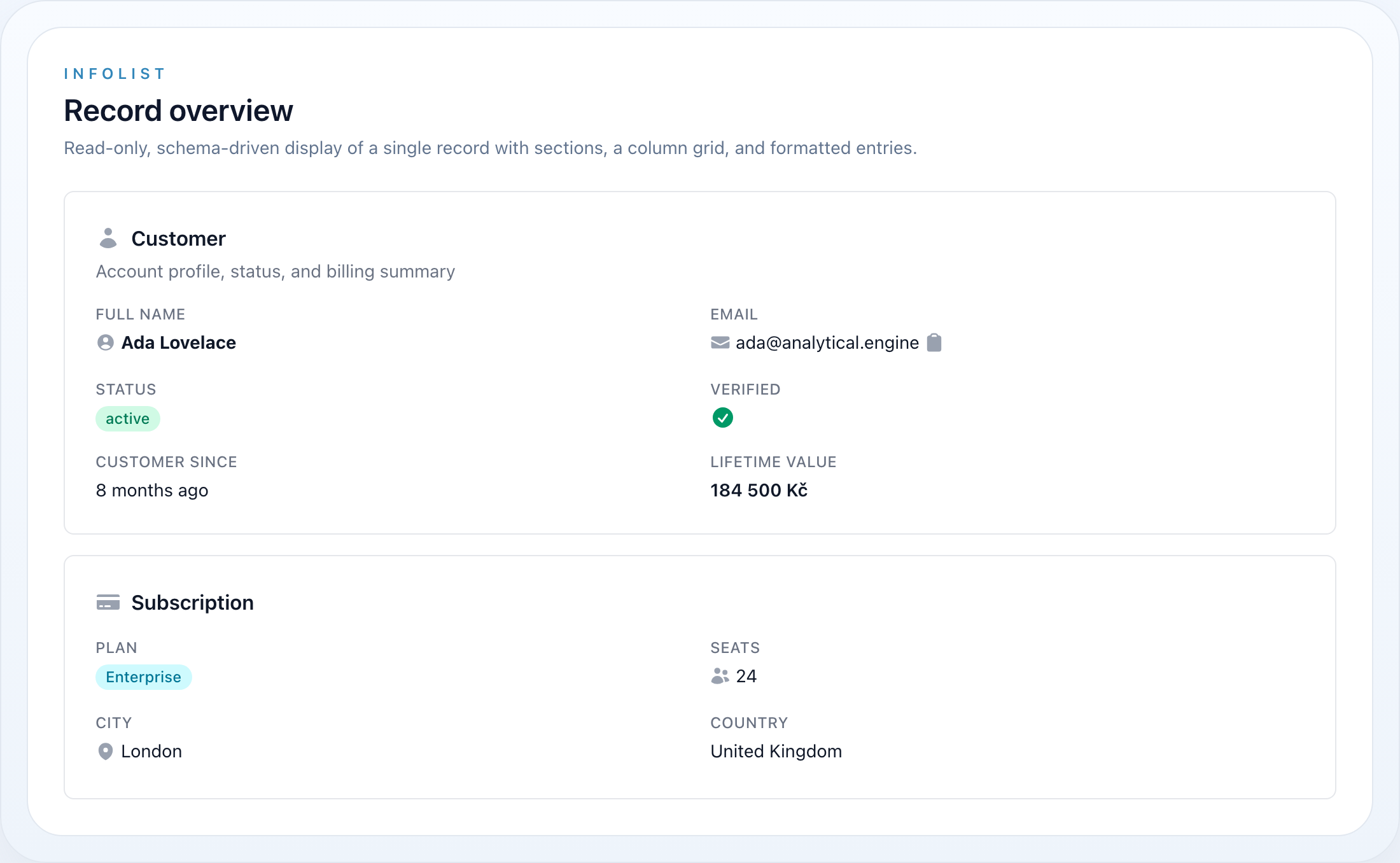
An infolist displays one record the way a form edits it: the same declarative schema, the same sections and grids, the same concerns for label, icon, colour and visibility. What it does not have is state, validation or a submit — read-only is not a form with the inputs disabled, it is a different object with a smaller job.
use NyonCode\WireCore\Infolists\Infolist;use NyonCode\WireCore\Infolists\Components\TextEntry;use NyonCode\WireCore\Infolists\Components\IconEntry;use NyonCode\WireCore\Foundation\Schema\Section;use NyonCode\WireCore\Foundation\Colors\Color; Infolist::make() ->record($user) ->schema([ Section::make('Profile')->icon('user')->columns(2)->schema([ TextEntry::make('name')->weight('bold'), TextEntry::make('email')->icon('envelope')->copyable(), TextEntry::make('created_at')->dateTime()->since(), TextEntry::make('status') ->badge() ->color(fn ($state) => $state === 'active' ? Color::Success : Color::Gray), IconEntry::make('is_verified')->boolean(), ]), ]);New to this? An infolist is just a list of things to show about one record. You build it in PHP, hand it a record, and echo it in Blade. The rest of this page builds up from the simplest possible example.
Installation
Infolists ship with wire-core — nothing extra to install. Make sure the package views are in your Tailwind content paths so the styles are generated:
export default { content: [ // ...your app paths './vendor/nyoncode/wire-core/resources/views/**/*.blade.php', ],}Quick start
An infolist lives on a Livewire component. The simplest way is a computed property that returns the Infolist, which you then echo in the component's view.
use Livewire\Attributes\Computed;use Livewire\Component;use NyonCode\WireCore\Infolists\Infolist;use NyonCode\WireCore\Infolists\Components\TextEntry;use NyonCode\WireCore\Foundation\Schema\Section; class ShowUser extends Component{ public User $user; // the record you want to display #[Computed] public function infolist(): Infolist { return Infolist::make() ->record($this->user) // 1. give it the record ->schema([ // 2. list what to show Section::make('Profile') ->columns(2) ->schema([ TextEntry::make('name'), // reads $user->name TextEntry::make('email')->copyable(), ]), ]); } public function render() { return view('livewire.show-user'); }}{{-- resources/views/livewire/show-user.blade.php --}}<div> {{ $this->infolist }} {{-- 3. render it --}}</div>That's the whole loop: record in → schema → echo out. {{ $this->infolist }} works because an Infolist is Htmlable and $this->infolist resolves the computed property — no special helper or trait required.
You can name the method anything (
$this->orderInfolist,$this->summary, …) and have several on one component — see Composing the schema.
Entry types at a glance
| Entry | Class | Use for |
|---|---|---|
| Text | TextEntry |
Text, numbers, money, dates — plus badge, copy, list, and truncation |
| Badge | BadgeEntry |
A TextEntry preset as a colored pill |
| Icon | IconEntry |
Booleans and state → icon maps |
| Boolean | BooleanEntry |
An IconEntry preset to boolean check/x |
| List | ListEntry |
A collection as a bulleted list or badge chips |
| Image | ImageEntry |
Avatars and thumbnails (single or gallery) |
| Color | ColorEntry |
A color swatch + its value |
| Key-value | KeyValueEntry |
An array / JSON attribute as a key/value table |
| Repeatable | RepeatableEntry |
A nested entry schema repeated per item of a relation/array |
| Changes | ChangesEntry |
A before-and-after diff as one table, a row per field |
| Html | HtmlEntry |
Stored rich text printed as markup, with its mentions resolved on every render |
Enum casts. Entries read enum-cast attributes safely:
TextEntryrenders the enum label (via theEnum\HasLabelcontract, else the backing value / case name), andIconEntryauto-resolves its icon and color from an enum implementingEnum\HasColor/Enum\HasIcon. See Foundation → Enums.
The Infolist object
Infolist::make() builds the container; record() binds the data source (an Eloquent model or a plain array), schema() holds the entries and layout, and columns() sets the top-level grid.
Infolist::make() ->record($order) // Model|array ->columns(2) // top-level grid columns (default 1) ->schema([ /* … */ ]);state(array $data) is an alias for record() when the source is a plain array:
Infolist::make()->state(['name' => 'Ada', 'email' => 'ada@example.com'])->schema([ TextEntry::make('name'), TextEntry::make('email'),]);The record is propagated to every entry automatically when the infolist renders, recursing through layout components.
getSchema() is where the schema becomes final, and it is read through a plugin hook: infolist.configuring runs there, once, and the answer is memoized — so an installed package can add an entry to a detail page it does not own, and a schema read twice does not gain the entry twice. Re-declaring schema() asks again, because a re-declared schema is a different infolist. See Hooks.
Composing the schema
Can I add more than a couple of fields? Yes —
schema()is just a list. Put as many entries as you like, group them with as many sections as you like, and mix any entry types together. There is no limit and no special wiring; you are only arranging objects in an array.
Add as many entries as you need. Each make('column') line shows one value:
Section::make('Profile')->columns(2)->schema([ TextEntry::make('name'), TextEntry::make('email'), TextEntry::make('phone'), TextEntry::make('created_at')->date(), IconEntry::make('is_verified')->boolean(), // ...add more, in any order]);Use several sections to break a record into logical groups — each is a separate card:
Infolist::make()->record($order)->schema([ Section::make('Customer')->columns(2)->schema([ TextEntry::make('customer.name'), TextEntry::make('customer.email'), ]), Section::make('Payment')->columns(2)->schema([ TextEntry::make('total')->money(), TextEntry::make('status')->badge(), ]), Section::make('Notes')->schema([ TextEntry::make('notes')->prose(), ]),]);Nest layouts — a Grid or Fieldset can live inside a Section, and a RepeatableEntry carries its own sub-schema:
Section::make('Order')->schema([ Grid::make()->columns(3)->schema([ TextEntry::make('number'), TextEntry::make('placed_at')->date(), TextEntry::make('total')->money(), ]), RepeatableEntry::make('items')->columns(3)->schema([ TextEntry::make('label'), TextEntry::make('qty')->numeric(), TextEntry::make('price')->money(), ]),]);You don't even need a section — entries can sit directly in the infolist, arranged by the top-level columns():
Infolist::make()->record($user)->columns(2)->schema([ TextEntry::make('name'), TextEntry::make('email'),]);Several infolists on one page — just define more than one computed property and echo each where you want it:
#[Computed]public function profile(): Infolist { /* ... */ } #[Computed]public function billing(): Infolist { /* ... */ }<div class="space-y-6"> {{ $this->profile }} {{ $this->billing }}</div>Rule of thumb: if you can describe what to show as "this value, then that value, grouped under these headings", you can express it here — one entry per value, one section per group.
State resolution
By default an entry reads its value from the record by name, with dot notation for relations and nested arrays (resolved via data_get):
TextEntry::make('name'); // $record->nameTextEntry::make('company.name'); // $record->company->nameTextEntry::make('address.city'); // $record['address']['city']Override resolution with state() (receives the record), transform the resolved value with formatStateUsing() (receives $state, $record), and provide a fallback with default():
TextEntry::make('full_name') ->state(fn ($record) => $record->first_name.' '.$record->last_name); TextEntry::make('status') ->formatStateUsing(fn ($state) => ucfirst($state)) ->default('—');color(), and any other dynamic property, also accept a closure resolved with $state and $record:
TextEntry::make('priority') ->badge() ->color(fn ($state) => match ($state) { 'high' => Color::Danger, 'medium' => Color::Warning, default => Color::Gray, });Layout
Infolists use the canonical schema layout from NyonCode\WireCore\Foundation\Schema — the same classes the form layouts subclass:
use NyonCode\WireCore\Foundation\Schema\Section;use NyonCode\WireCore\Foundation\Schema\Grid;use NyonCode\WireCore\Foundation\Schema\Fieldset; Section::make('Billing') ->icon('credit-card') ->description('Plan and invoicing details') ->columns(2) ->collapsible() ->schema([ Grid::make()->columns(3)->schema([ /* entries */ ]), Fieldset::make('Tax')->schema([ /* entries */ ]), ]);Every entry accepts columnSpan(int) / columnSpanFull() to span the grid.
Flex
Flex arranges its children side by side on one horizontal (flexbox) axis, stacking vertically on small screens — useful for pairing a details card with a summary, or an avatar with a bio. Children grow to share the row evenly; from() sets the breakpoint (sm / md / lg, default md) at which the row becomes horizontal.
use NyonCode\WireCore\Foundation\Schema\Flex; Flex::make()->from('lg')->schema([ Section::make('Details')->schema([ /* entries */ ]), Section::make('Summary')->schema([ /* entries */ ]),]);Infolist API
| Method | Description |
|---|---|
make() |
Create an infolist |
record(Model|array) |
Bind the data source |
state(array) |
Bind a plain array (alias of record()) |
schema(array) |
Entries and layout components |
columns(int) |
Top-level grid columns (default 1) |
getRecord() / getSchema() / getColumns() / getLivewireComponent() |
Accessors |
toHtml() |
Render (also via Htmlable echo) |
In This Section
| Page | What it covers |
|---|---|
| Entries | Every entry type — text, badge, icon, boolean, list, image, colour, key-value, repeatable, changes |
| Actions | Buttons on an infolist, and an infolist rendered inside an action modal |
Related
- Editable Panels — the same shape, with entries that write back
- Schema — the layout vocabulary shared with forms
- Panels: Pages — the view page that renders one of these
- Forms — the editing counterpart