Core
Toasts
The on-screen notification — where it is mounted, how long it stays, and how to fire one from JavaScript.
On this page
A toast is the notification you see and then do not: it appears in a corner, stays as long as its severity deserves, and leaves. This page is the driver that draws it, the Blade component that hosts it, and the one JavaScript entry point for code that never touched PHP.
Toasts
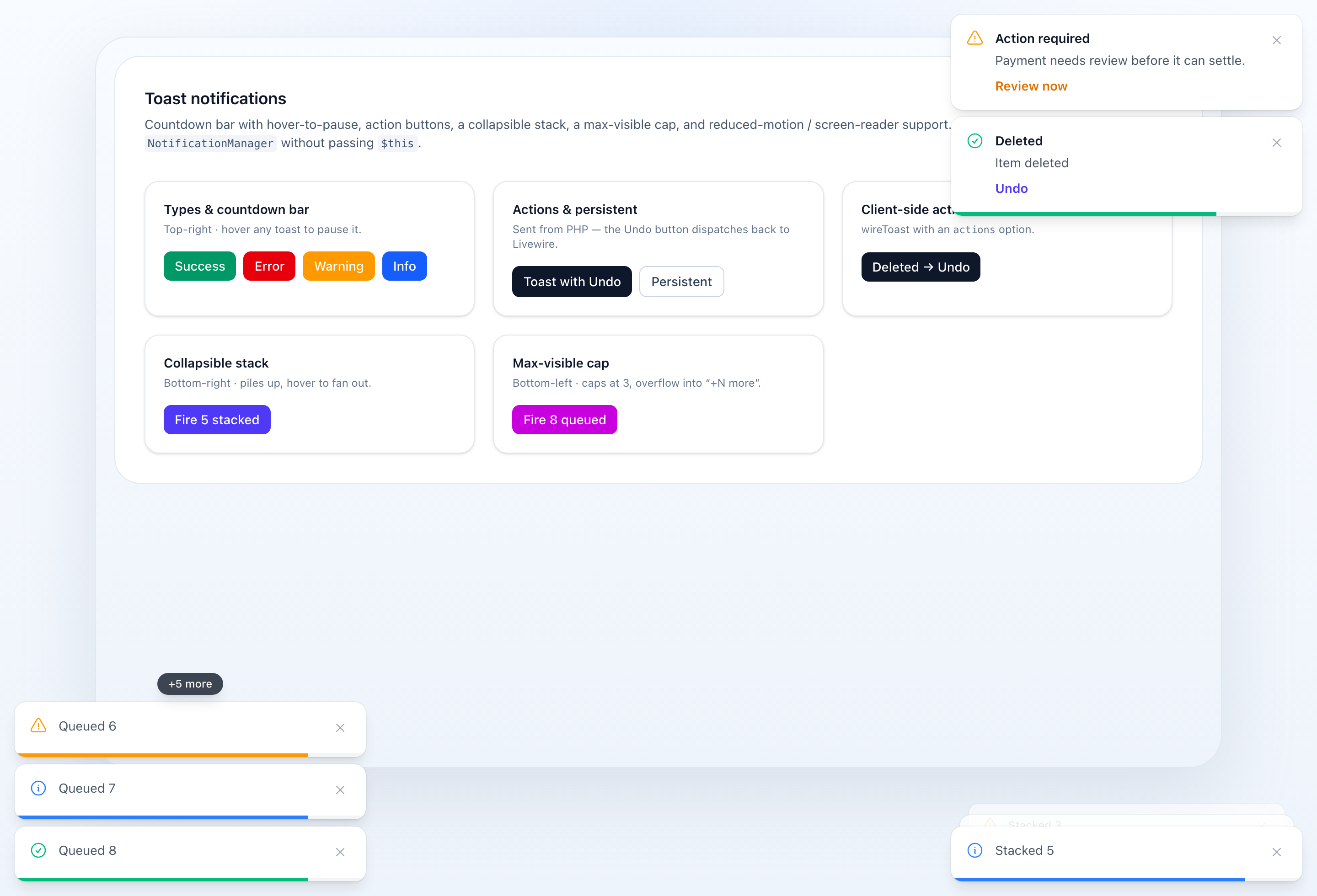
Everything below is rendered by <x-wire-notifications::toast-container /> — the drivers only dispatch payloads; the container decides how a toast looks and behaves.
Countdown bar
Each auto-dismissing toast shows a thin countdown bar along its bottom edge that depletes as the toast ages, so users can see how long until it closes. Hovering any toast pauses the bar and the auto-dismiss (and resumes on leave). The bar is on by default and colored by the notification type.
- It is optional — pass
:progress="false"to hide it. - Persistent toasts have no bar — a sticky toast never counts down, so there is nothing to show (see below).
<x-wire-notifications::toast-container :progress="false" /> {{-- no countdown bar --}}Persistent toasts
Call ->persistent() (or ->duration(0)) to make a toast sticky: it stays until the user dismisses it and shows no countdown bar. Ideal for messages that require a decision.
NotificationManager::send( Notification::warning('Payment needs review before it can settle.') ->title('Action required') ->persistent());Action buttons
Add buttons that dispatch a Livewire event on click — the "Undo" affordance. Your host component listens with #[On(...)].
use NyonCode\WireCore\Notifications\Notification;use NyonCode\WireCore\Notifications\NotificationAction; // shorthand: label + Livewire eventNotificationManager::send( Notification::success('Item deleted')->action('Undo', 'restore-record')); // full controlNotificationManager::send( Notification::success('Order #1042 saved')->action( NotificationAction::make('Undo', 'restore-record') ->payload(['id' => 1042]) // sent with the dispatched event ->color('primary') // button accent (falls back to the toast type) ->keepOpen() // don't dismiss the toast after clicking ));// in the host Livewire component#[On('restore-record')]public function restore(int $id): void{ // …}NotificationAction is an immutable value object: make(label, event), ->payload([...]), ->color(...), ->keepOpen(). Clicking dispatches Livewire.dispatch(event, payload) and (unless keepOpen()) closes the toast.
Stacking & overflow
stackcollapses toasts into a tidy pile; hovering the pile fans them out into the full list. The newest toast sits closest to the anchor edge.maxcaps how many are visible at once; extras collapse into a clickable “+N more” pill that reveals the rest.
<x-wire-notifications::toast-container stack :max="5" />Toasts That Outlive The Page
A toast is a browser event, and some notifications are raised by a request that
then leaves: an action with successRedirect(), a create page landing on the
record it just filed, a controller redirecting after a write. The event is
dispatched into a document that is about to be replaced, so nothing shows it.
The session driver — the default — flashes the same notification as well, and the container renders that on arrival:
NotificationManager::success('Order filed'); $this->redirect($url, navigate: true);// the toast appears on the page that loads nextNothing has to be switched on, and nothing has to be cleaned up. A toast never
arrives twice, and the reason is Livewire's rather than this package's: an
update that did not redirect has its flashed keys forgotten
(SupportRedirects), so an ordinary save has already shown its toast as an event
and leaves nothing for the next page to show again. Only the notification that
genuinely could not be delivered survives the boundary.
The container shows a flashed toast once per render, so Livewire's cached back-button copy of a page does not raise it again.
Two consequences worth knowing:
- A driver that dispatches but does not flash —
LivewireEventDriveron a page with a component to dispatch to — has nothing to carry across a redirect. Pair it with the session driver, or use the default. - One request, one carried toast: the flash holds the last notification sent. Two notifications and a redirect arrive as one.
Accessibility
The container is an aria-live="polite" region (error toasts use role="alert"), so screen readers announce toasts as they arrive. It also honors prefers-reduced-motion: when reduced motion is requested, the stack never collapses/fans out and card transitions are disabled.
Triggering Toasts from JavaScript
The toast container installs a global window.wireToast helper (and an Alpine $toast magic) when it mounts, so you can pop a toast straight from the frontend — no server round-trip. The helper simply dispatches the container's eventName window event with the standard payload (type, message, title, duration).
// shorthand — type + messagewireToast.success('Saved');wireToast.error('Something went wrong');wireToast.warning('Careful');wireToast.info('Heads up'); // with options (title, duration, …)wireToast.success('Saved', { title: 'Done', duration: 6000 }); // full payload object (type defaults to 'info' if omitted)wireToast({ type: 'success', message: 'Saved', title: 'Done' });wireToast('Plain info toast');Inside Alpine, use the $toast magic:
<button @click="$toast.success('Copied!')">Copy</button>The helper targets the container's configured eventName, so a custom event-name="my-toast" is wired up automatically. window.wireToast is installed once (the first container wins); if you render multiple containers with different event names, dispatch the CustomEvent yourself for the secondary ones:
window.dispatchEvent(new CustomEvent('my-toast', { detail: { type: 'success', message: 'Saved' },}));Blade Component
Place the toast container in your layout:
<x-wire-notifications::toast-container />You can customize the position, the fallback auto-dismiss duration, and the browser event it listens for:
<x-wire-notifications::toast-container position="bottom-right" :duration="5000" event-name="table-notification" />| Prop | Default | Purpose |
|---|---|---|
position |
top-right |
top-left / top-center / top-right / bottom-left / bottom-center / bottom-right |
duration |
4000 |
fallback auto-dismiss (ms) for notifications without their own duration |
event-name |
table-notification |
the window event it listens for (x-on:{eventName}.window) |
session-key |
table-notification |
the flashed key it renders on arrival (see Toasts That Outlive The Page); match it to the driver's sessionKey if you renamed that |
progress |
true |
show the per-toast countdown bar (see Countdown bar) |
stack |
false |
collapse toasts into a pile that fans out on hover |
max |
0 |
cap the number of visible toasts (0 = unlimited); the overflow collapses into a “+N more” pill |
Related
- Notifications — the object being delivered
- Persistent Notifications — when it must outlive the page
- Where To Send From — the call sites
- Table Notifications — what a table says on its own